
Single Payment Against Multiple Invoices
هذا المحتوى غير متوفر بلغتك بعد.
A single bank receipt or payment can settle several invoices. Keep it as one Payment Entry and use the References table to show exactly how the amount is distributed.
Before you begin
Section titled “Before you begin”Confirm the correct Company, currency, receivable or payable account, and bank or cash ledger. Use submitted source documents and keep the bank reference or remittance advice available.
Use Single Payment Against Multiple Invoices
Section titled “Use Single Payment Against Multiple Invoices”- Create the Payment Entry for the correct party.
- Enter the actual bank amount and reference.
- Fetch outstanding invoices.
- Select the invoices included in the remittance and set each allocation.
- Record any discount, fee, withholding, or exchange difference explicitly.
- Confirm totals and submit.
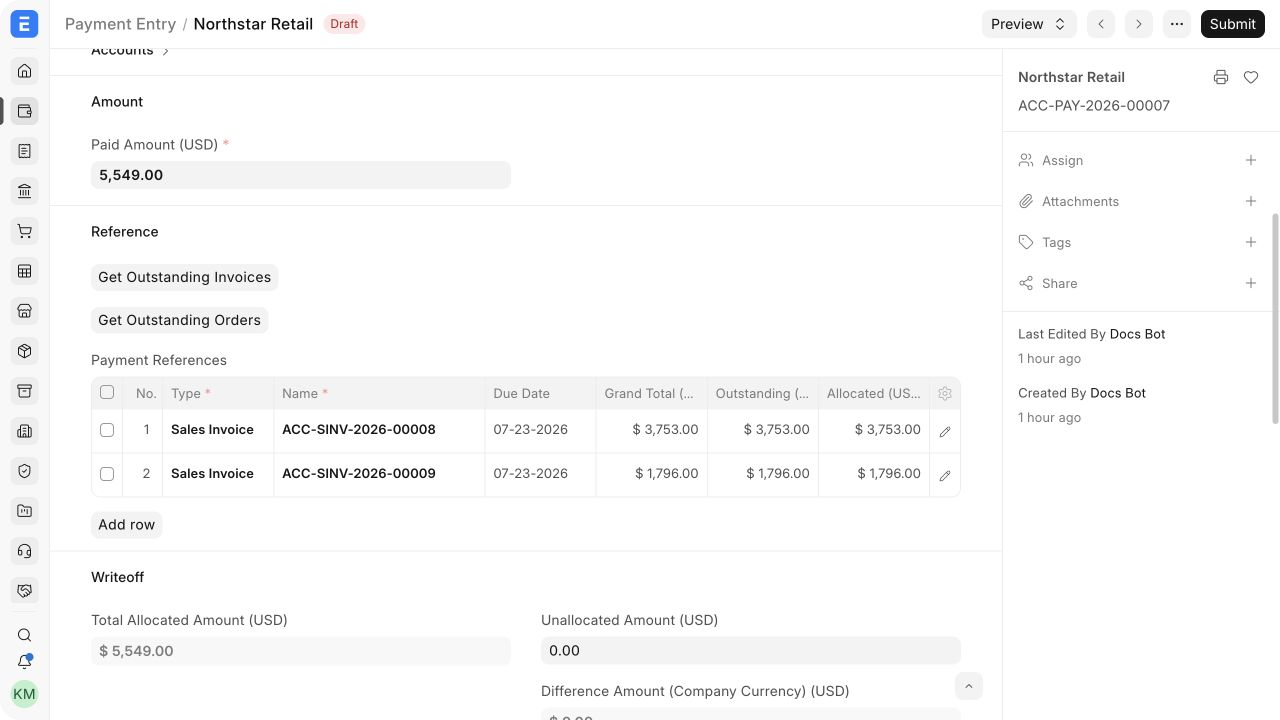
Important fields and what they mean
Section titled “Important fields and what they mean”| Field | What it controls |
|---|---|
| Outstanding Amount | Balance available to clear on each invoice. |
| Allocated Amount | Portion of this payment assigned to the invoice. |
| Total Allocated Amount | Sum across references. |
| Unallocated Amount | Payment balance left for later allocation. |
| Difference Amount | Amount that requires an accounting explanation. |
What happens after you submit or process
Section titled “What happens after you submit or process”Bravo Hub ERP updates the relevant accounting records and, where applicable, the outstanding or unallocated amounts. Review the General Ledger, party ledger, and source document status before treating the workflow as complete. A saved draft does not affect the ledger.
Troubleshooting
Section titled “Troubleshooting”Selecting rows does not update the Paid Amount
Section titled “Selecting rows does not update the Paid Amount”Enter the actual payment amount, retain the intended invoice references, and set each Allocated Amount. Row selection alone is not a request to recalculate the bank amount.
The total allocation exceeds the payment
Section titled “The total allocation exceeds the payment”Reduce one or more allocations so the total does not exceed the amount available. Leave unpaid invoice balances outstanding rather than changing their totals.
One invoice is missing
Section titled “One invoice is missing”Check that all references belong to the same party, Company, receivable or payable account, and compatible currency. Confirm submission status and remaining outstanding amount.
Frequently asked questions
Section titled “Frequently asked questions”Can one payment settle both Sales Invoices and credit notes?
Section titled “Can one payment settle both Sales Invoices and credit notes?”Use only reference types supported by the current allocation dialog and confirm the net effect. Reconcile complex credit scenarios carefully and verify the party ledger.
Can invoices for different customers share one Payment Entry?
Section titled “Can invoices for different customers share one Payment Entry?”A standard Payment Entry has one party. Record separate entries per Customer and reconcile them to a combined bank deposit if necessary.
Can the payment partially settle every selected invoice?
Section titled “Can the payment partially settle every selected invoice?”Enter a partial Allocated Amount for each reference. Bravo Hub ERP leaves the remaining balances outstanding.
Which invoice should be allocated first?
Section titled “Which invoice should be allocated first?”Follow remittance advice. Without it, apply the company’s documented policy, such as oldest due first, and retain evidence of the decision.