
Changing Parent Account
هذا المحتوى غير متوفر بلغتك بعد.
The Parent Account determines where an Account appears in the Chart of Accounts tree and how its balance rolls up in financial reports. Change it when an existing ledger or group was placed under the wrong branch and must be reclassified.
For example, Nova Electronics Trading initially placed Warranty Fulfilment Costs under Indirect Expenses. Because these costs arise directly from fulfilling product warranties, the accounting team reclassifies the Account under Direct Expenses.
Changing the parent does not create a new Account and does not rewrite transaction amounts. It changes the structural classification of the existing Account, including how its current and historical balances roll up in reports.
Before you begin
Section titled “Before you begin”Confirm the accounting reason for the move with your accountant. A parent change can affect subtotals, gross profit, operating expenses, and the presentation of earlier periods even though total debit and credit remain unchanged.
Review the Account in the General Ledger, then save the relevant Trial Balance and financial statements before the change. These provide a comparison point after reclassification.
The target parent must:
| Requirement | Reason |
|---|---|
| Belong to the same Company | Each company maintains a separate Chart of Accounts. |
| Be a group Account | A ledger cannot contain child Accounts. |
| Belong to the correct root branch | The Account must remain under the intended Asset, Liability, Equity, Income, or Expense structure. |
| Support the intended report classification | The parent determines whether balances roll into the Balance Sheet or Profit and Loss Statement. |
Do not use this procedure to combine duplicate Accounts. Use Merge Account for a genuine duplicate. Do not create a new Cost Center merely to repair an Account hierarchy; Cost Centers serve a different reporting purpose.
Open the Account
Section titled “Open the Account”Open Chart of Accounts, select the company, and find the Account to move. Select the Account and open Edit, or open the Account directly from the Account list.
The example Account currently has Indirect Expenses - NET as its parent.
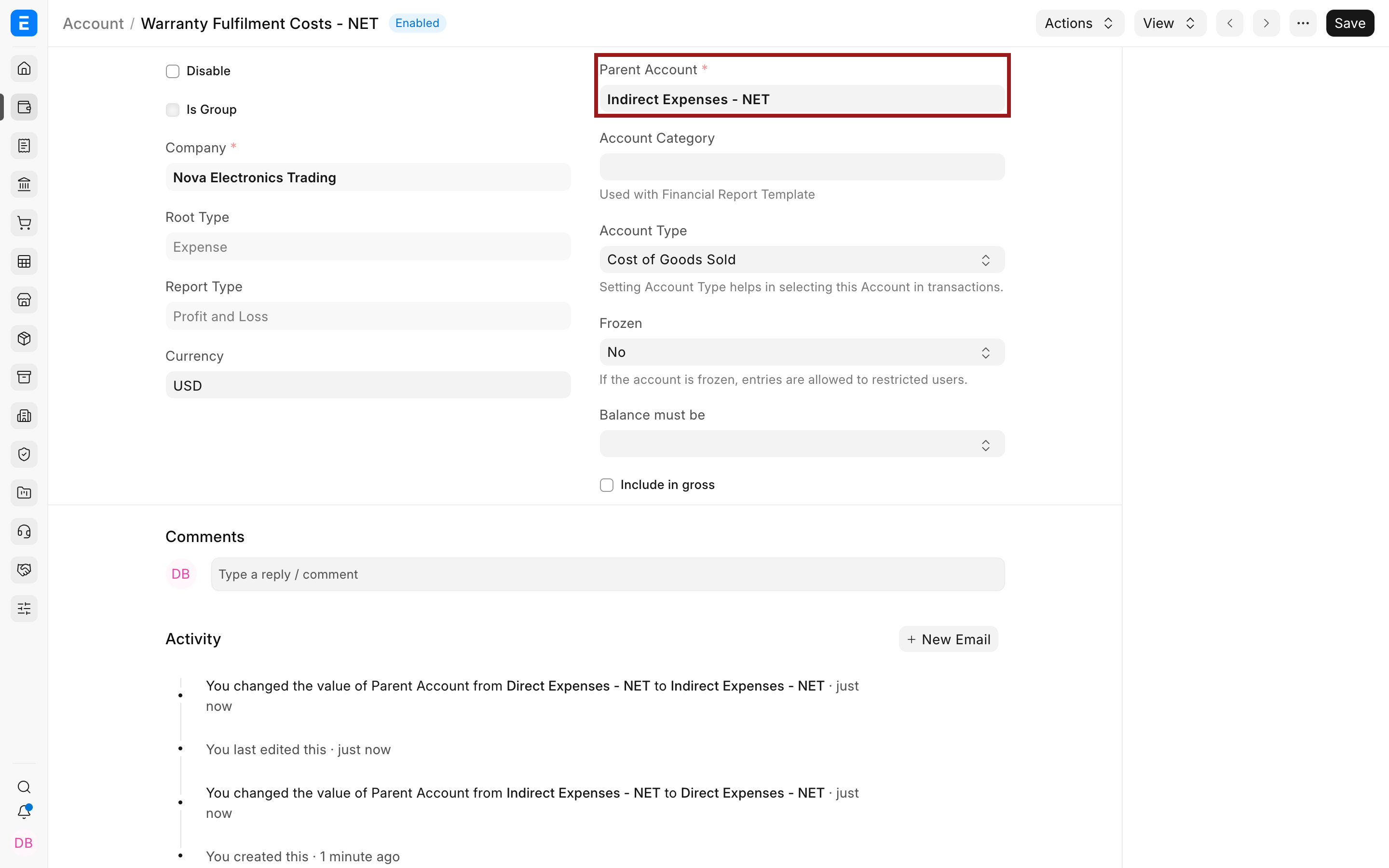
Before editing, confirm the Account name, Company, Root Type, Report Type, Currency, Account Type, and whether Is Group is enabled. If the Account is a group, the move also repositions every child beneath it.
Select the new parent
Section titled “Select the new parent”In Parent Account, select the correct target group. For this example, choose Direct Expenses - NET.
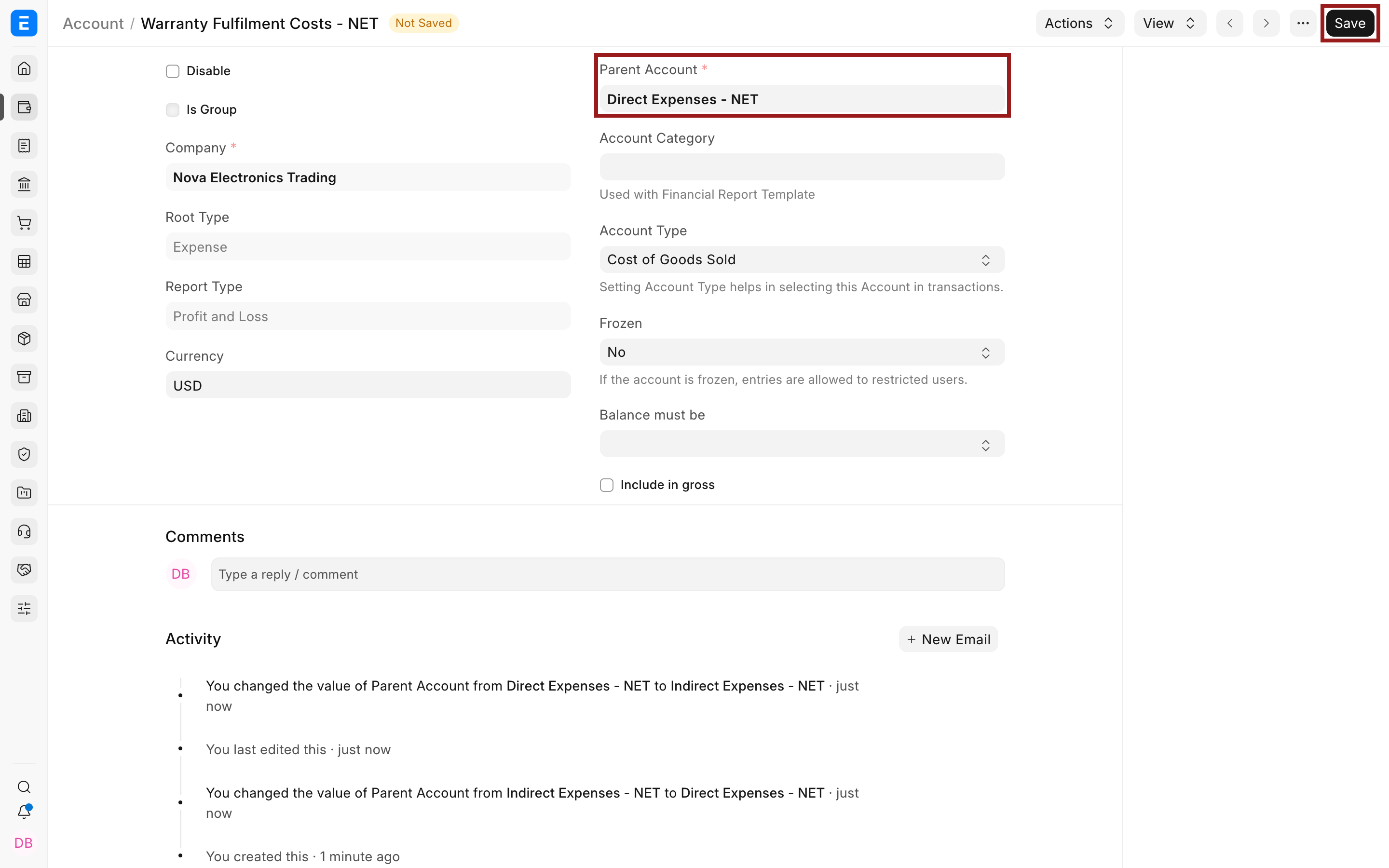
Review the full target name and company suffix, then select Save. Bravo Hub ERP validates that the target is a group in the same company and updates the tree relationship.
Confirm the saved result
Section titled “Confirm the saved result”After saving, the Account retains its identity but shows the new parent. The activity timeline records the Parent Account change.
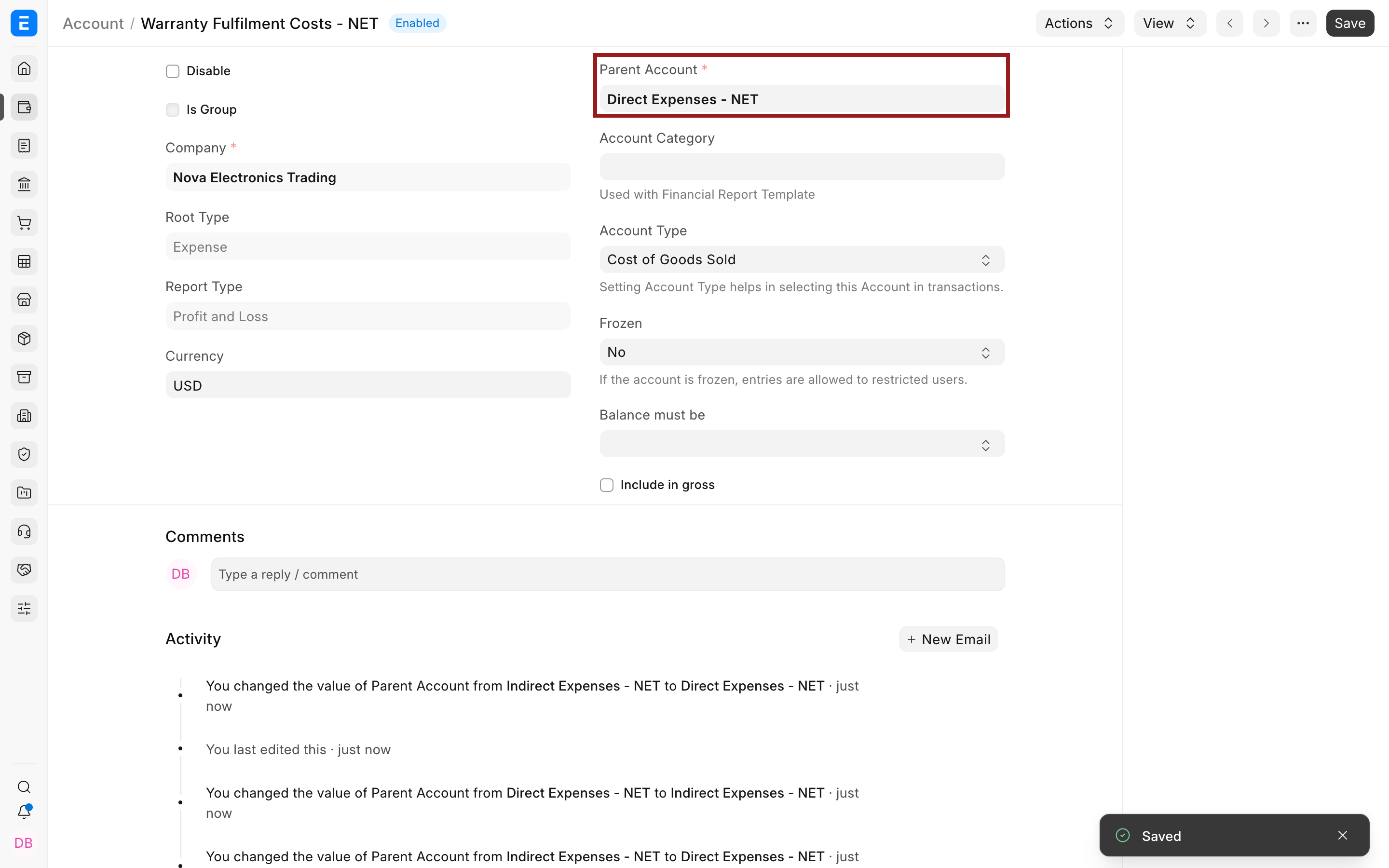
Return to Chart of Accounts and confirm the Account appears under the intended branch. Re-run the same reports used before the change.
For the example:
| Before | After | What stays the same |
|---|---|---|
| Warranty Fulfilment Costs rolls into Indirect Expenses. | Warranty Fulfilment Costs rolls into Direct Expenses. | Account identity, linked vouchers, debit and credit amounts, parties, and posting dates. |
The accounting entries remain linked to the same Account. Their presentation changes because the Account now rolls up through a different parent.
How the parent affects other fields
Section titled “How the parent affects other fields”Bravo Hub ERP derives structural values from the parent. Understand the difference before changing anything:
| Field | Meaning |
|---|---|
| Parent Account | Immediate group directly above the Account in the tree. |
| Root Type | Top-level accounting class: Asset, Liability, Equity, Income, or Expense. |
| Report Type | Balance Sheet or Profit and Loss, derived from the root branch. |
| Is Group | Indicates that the Account contains child Accounts and cannot receive normal transaction postings. |
| Account Type | Describes a special use such as Bank, Receivable, Payable, Tax, or Cost of Goods Sold. It is not the same as Parent Account or Root Type. |
If you move an Account to a different root branch, Bravo Hub ERP updates the structural classification from the target parent. Such a move can materially change financial statements and requires careful review.
Important fields and controls
Section titled “Important fields and controls”| Field or control | Guidance |
|---|---|
| Account | Existing ledger or group being moved. Do not create a duplicate. |
| Parent Account | Select the exact group that should contain the Account. |
| Company | Must match the target parent. |
| Root Type | Review the resulting top-level classification. |
| Report Type | Review whether the balance belongs in Balance Sheet or Profit and Loss. |
| Is Group | If enabled, all child Accounts move with the group. |
| Account Type | Confirm the special use still makes sense in the new branch. |
| Save | Applies the structural change and records it in the timeline. |
Troubleshooting
Section titled “Troubleshooting”The target does not appear in Parent Account
Section titled “The target does not appear in Parent Account”Confirm it is a group Account in the same company. A normal ledger cannot be selected as a parent. If the group does not exist, create it from the Chart of Accounts tree before moving the child.
The Report Type is not editable
Section titled “The Report Type is not editable”This is expected. Bravo Hub ERP derives Report Type from the parent and root branch. Select the correct Parent Account instead of forcing the field through customization or browser scripts.
Historical financial statements changed
Section titled “Historical financial statements changed”The Account’s balance now rolls up through the new parent, including historical transactions. Compare the before-and-after reports and confirm that this is the intended reclassification. The company’s total balanced Journal Entries should not change.
I moved a group and several Accounts moved with it
Section titled “I moved a group and several Accounts moved with it”That is expected. A group carries its full subtree. Review every child before saving a group-level parent change.
The tree still shows the previous structure
Section titled “The tree still shows the previous structure”Reload Chart of Accounts and expand the target branch. If the saved Parent Account is correct but the tree remains inconsistent, investigate before using a repair tool.
Is Parent Account the same as Root Type?
Section titled “Is Parent Account the same as Root Type?”No, Parent Account is the immediate group above the Account. Root Type is the top-level accounting class inherited through the tree.
Does changing the parent move existing transactions?
Section titled “Does changing the parent move existing transactions?”The transactions remain linked to the same Account. Their balances are presented under the Account’s new parent hierarchy.
Can I move an Account from Profit and Loss to Balance Sheet?
Section titled “Can I move an Account from Profit and Loss to Balance Sheet?”Only with a valid accounting reason and careful review. Such a move changes the report classification of all balances linked to the Account.
Can a ledger Account become a parent?
Section titled “Can a ledger Account become a parent?”No, A parent must be a group. Convert or create the correct group only when the Account has no incompatible transactions or children and the accounting design supports it.
Should I change parents through Data Import?
Section titled “Should I change parents through Data Import?”For a small number of Accounts, use the Account form so each change can be reviewed. For a migration or large redesign, use a tested Chart of Accounts Importer plan in a non-production site before updating live data.