
Difference Entry
هذا المحتوى غير متوفر بلغتك بعد.
The Make Difference Entry action helps you complete an unbalanced Journal Entry. Bravo Hub ERP calculates the difference between Total Debit and Total Credit, adds a new accounting row for that amount, and leaves the Account blank for you to choose.
It is a balancing aid inside Journal Entry, not a separate transaction and not an automatic correction. You must understand why the difference exists and select the account that represents it. If the source amount, exchange rate, tax, or original account is wrong, correct that value instead of hiding the error in a difference account.
In this example, Nova Electronics Trading pays $1,000 from its bank. The main office-maintenance expense is $990 and the bank charges a $10 fee. The first two rows are therefore out of balance. Make Difference Entry adds the missing $10 debit, after which the user selects Bank Charges - NET.
| Account | Debit | Credit | Meaning |
|---|---|---|---|
| Office Maintenance Expenses | $990.00 | $0.00 | Main expense paid. |
| Bank Charges | $10.00 | $0.00 | Separate fee deducted by the bank. |
| Nova Operating Bank | $0.00 | $1,000.00 | Total reduction in the bank balance. |
| Total | $1,000.00 | $1,000.00 | The Journal Entry is balanced. |
Before you begin
Section titled “Before you begin”Confirm the following:
- You know what caused the imbalance and have supporting evidence for the amount.
- The correct ledger exists in the Company’s Chart of Accounts. Use a non-group account belonging to the selected Company.
- The Posting Date is open and belongs to the intended Fiscal Year and Accounting Period.
- Any required Cost Center, Project, Finance Book, or other Accounting Dimension is available.
- For bank entries, you have the bank reference number and date. For ordinary Customer or Supplier receipts, consider whether a Payment Entry is the safer transaction.
Identify the difference
Section titled “Identify the difference”- Create or open a Draft Journal Entry.
- Select the Company, Entry Type, and Posting Date.
- Add the known debit and credit rows under Accounting Entries.
- Review Total Debit, Total Credit, and Difference (Dr - Cr).
The example has a $990 debit and a $1,000 credit. Bravo Hub ERP shows a difference of -$10 and makes Make Difference Entry available.
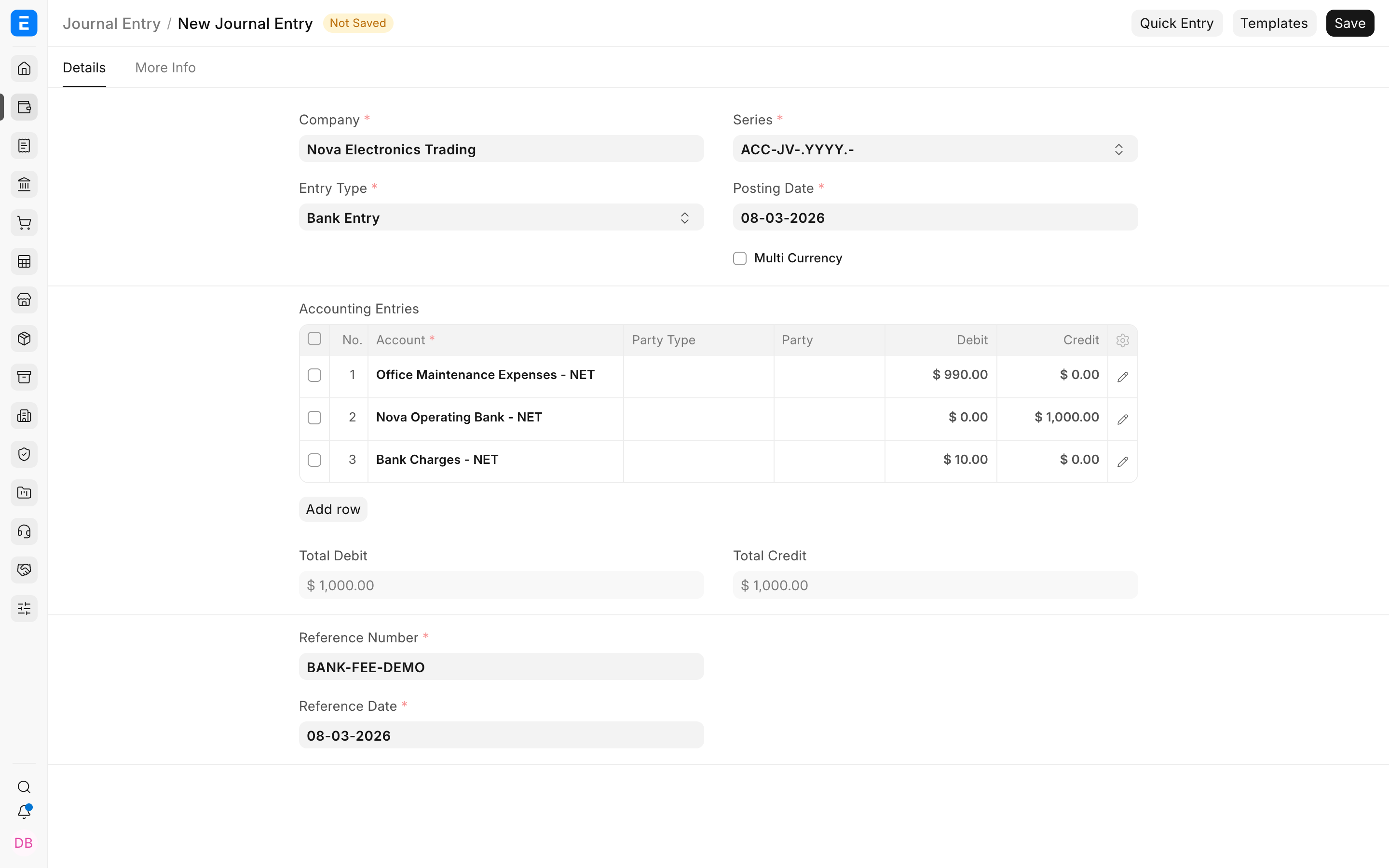
Before continuing, check whether the difference is legitimate. A missing bank fee is legitimate. A transposed amount, duplicate row, wrong currency, or incorrect exchange rate should be fixed at its source.
Add and complete the difference row
Section titled “Add and complete the difference row”- Select Make Difference Entry.
Bravo Hub ERP adds one row for the exact amount required to make Total Debit equal Total Credit. Because credit exceeds debit by $10 in this example, it adds a $10 debit row.
- Select the highlighted pencil icon on the new row.
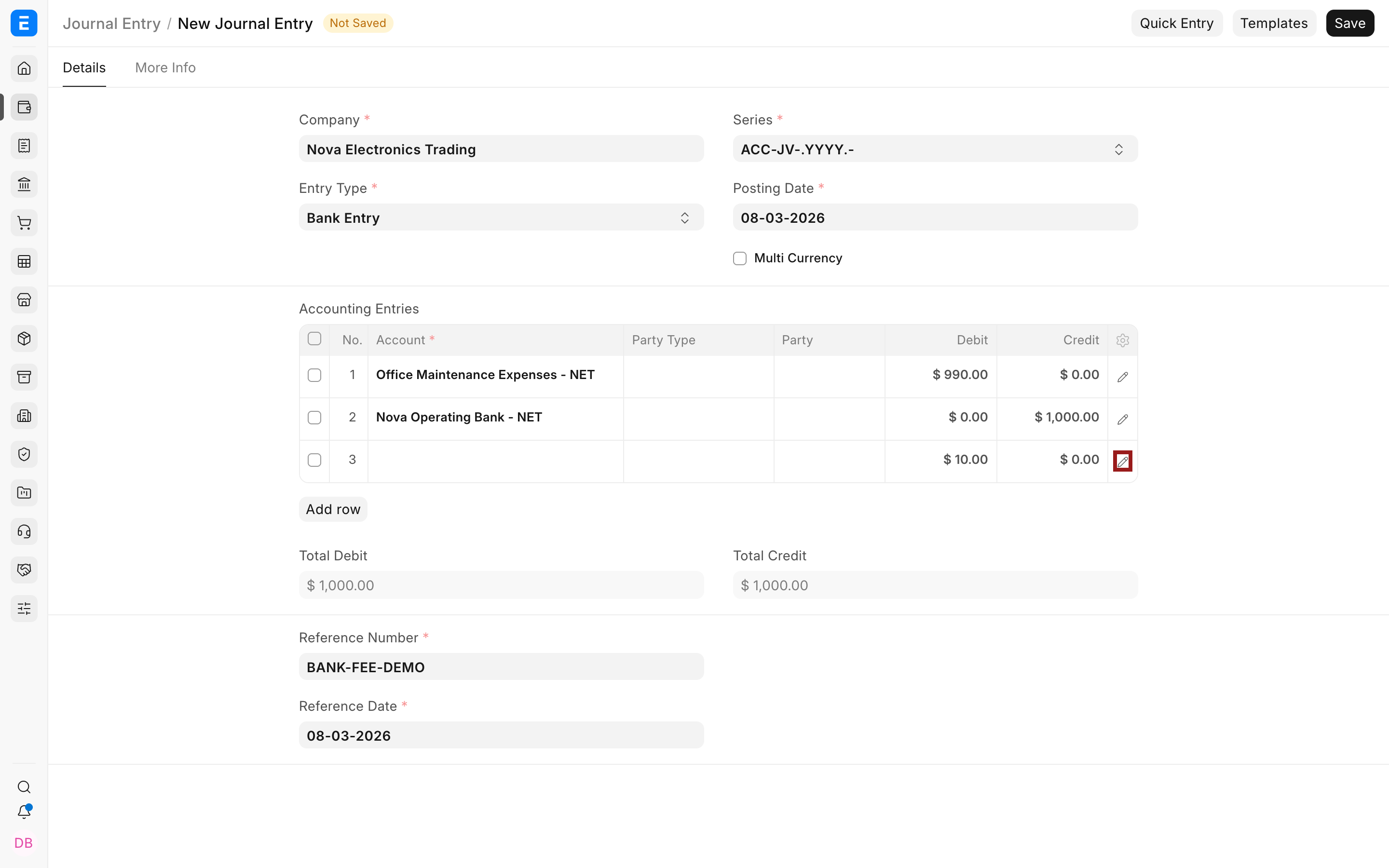
- Select the Account that explains the difference. In the example, select Bank Charges - NET.
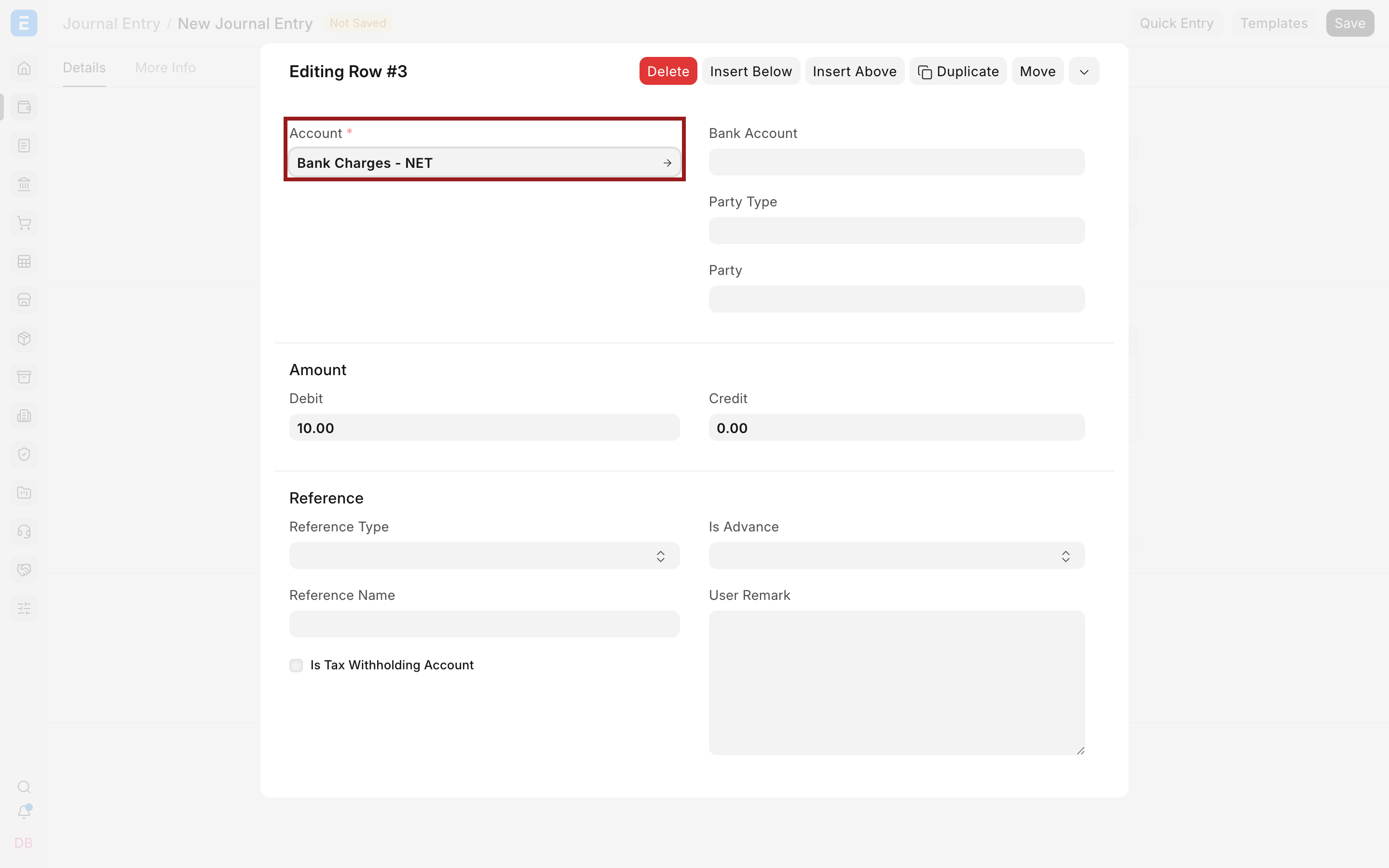
- Add the same Cost Center, Project, Finance Book, or other dimensions required by your accounting policy.
- Close the row editor and review the complete table.
Total Debit and Total Credit are now both $1,000. The entry is mathematically balanced, but you must still confirm that every account and amount is economically correct. Balanced totals do not prove correct accounting.
Submit and verify the result
Section titled “Submit and verify the result”- Review the Company, Posting Date, Entry Type, accounts, amounts, references, remarks, currencies, and dimensions.
- Save and submit the Journal Entry.
- Confirm that the submitted document contains the original rows and the completed difference row.
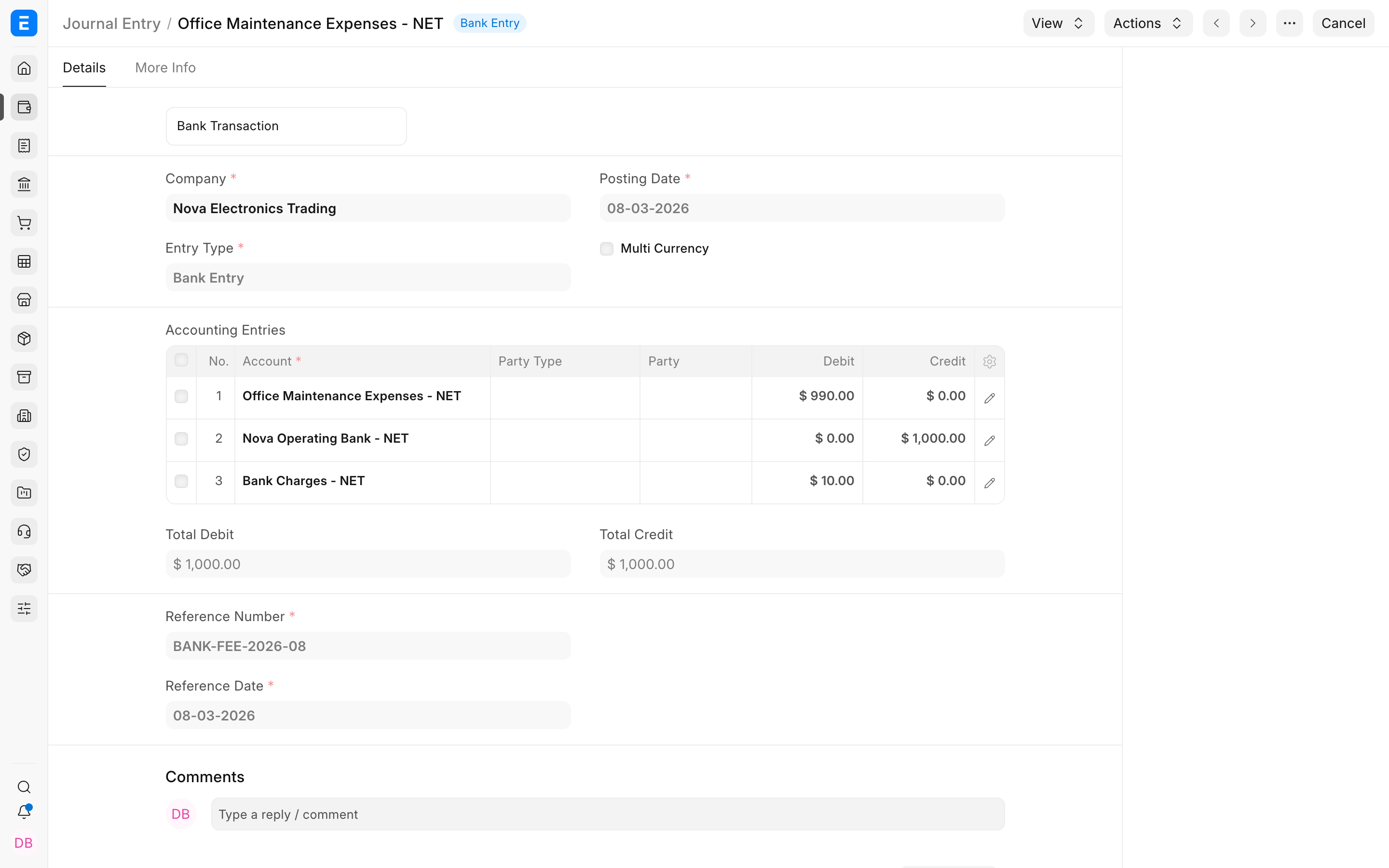
- Open View > Ledger, or run the General Ledger using the Journal Entry as the voucher filter.
- Confirm the debit and credit for each account and the zero total balance across the voucher.
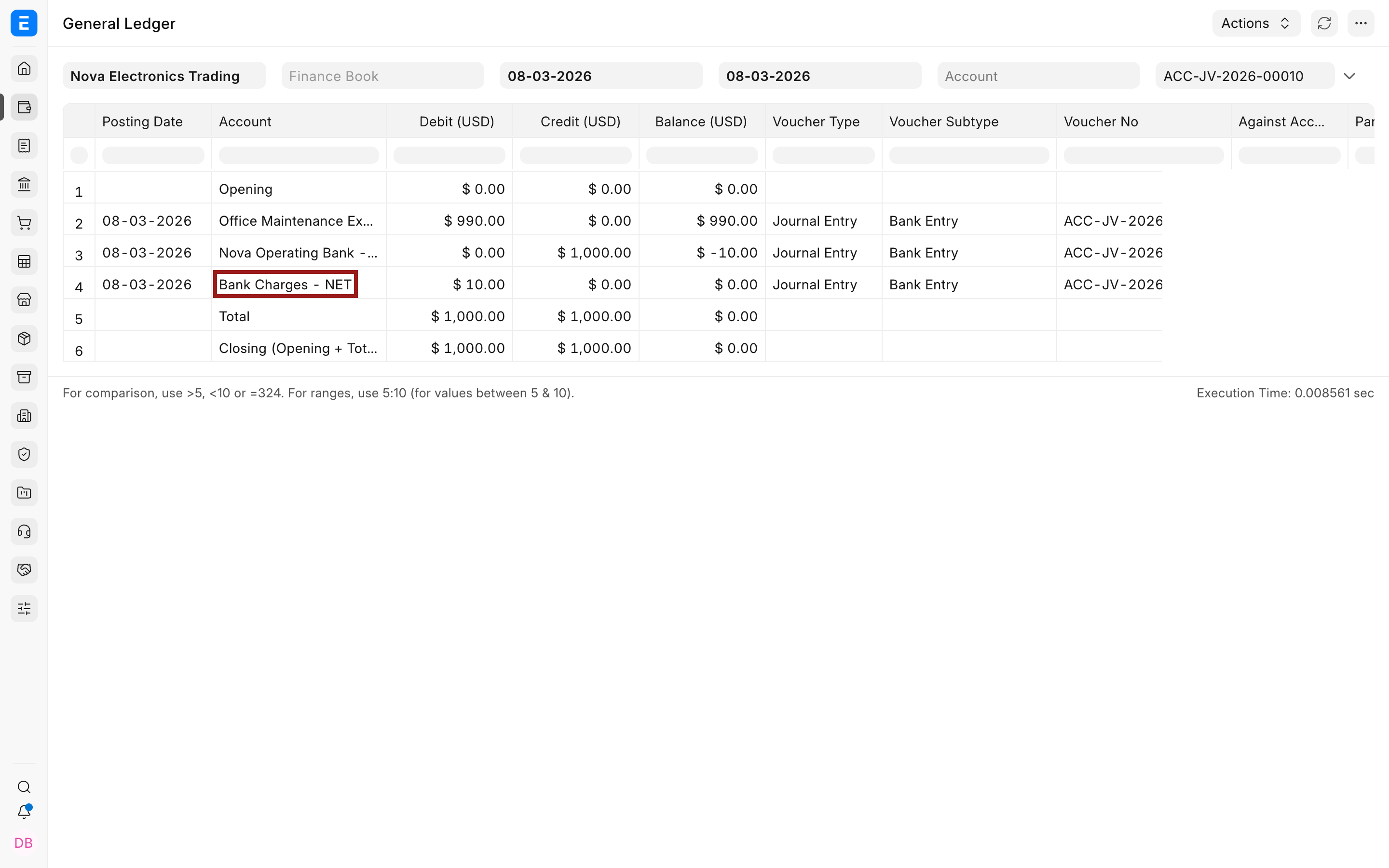
In the example, the ledger shows a $990 debit to Office Maintenance Expenses, a $10 debit to Bank Charges, and a $1,000 credit to the operating bank account.
Important fields and what they mean
Section titled “Important fields and what they mean”| Field or action | What it controls |
|---|---|
| Total Debit | Sum of the debit values in the accounting rows. |
| Total Credit | Sum of the credit values in the accounting rows. |
| Difference (Dr - Cr) | Total Debit minus Total Credit. A negative value means more debit is required; a positive value means more credit is required. |
| Make Difference Entry | Adds one debit or credit row for the current difference. It does not select the Account or confirm that the difference is valid. |
| Account | Ledger that receives the difference. Select the account that represents the actual economic event. |
| Debit or Credit | Amount added by Bravo Hub ERP to balance the voucher. Review it before submission. |
| Account Currency and Exchange Rate | Control the account-currency and Company-currency values in a multi-currency Journal Entry. |
| Reference Type and Reference Name | Link an accounting row to a supported document when the adjustment genuinely belongs to that reference. |
| Is Advance | Marks a party amount as an advance when it is not allocated to a specific invoice. |
| Cost Center and other dimensions | Classify the posting for management reporting without replacing the ledger account. |
When not to use Make Difference Entry
Section titled “When not to use Make Difference Entry”Do not use this action merely to make an error disappear.
- If an invoice, payment, or stock transaction is wrong, cancel and amend the source document where permitted instead of creating an unrelated balancing row.
- If a genuine receipt or payment is being recorded, use the purpose-built payment workflow so invoice allocation, party balance, bank reference, and reconciliation remain clear.
- If the difference comes from foreign currency conversion, review the account currency, exchange rate, and Company-currency values first. Use the supported exchange gain or loss process when that is the real cause.
- If a small decimal difference is caused by configured precision, first review the source values and System Settings. Do not change precision casually after live transactions exist.
- If the required treatment is recurring, create a controlled process or Journal Entry Template rather than repeatedly guessing the balancing account.
Troubleshooting
Section titled “Troubleshooting”| Issue | What to check |
|---|---|
| Make Difference Entry is not visible | The Journal Entry may already be balanced. Review Total Debit, Total Credit, and Difference. Also confirm the document is still in Draft. |
| The generated row has no Account | This is expected. Bravo Hub ERP supplies the amount only. Open the row and select the account that explains the difference. |
| The entry is balanced but submission still fails | Check mandatory party, reference, currency, Cost Center, bank-reference, account-type, and frozen-period requirements. Mathematical balance is only one validation. |
| A tiny difference keeps appearing | Check entered amounts, account currency, exchange rates, and precision. Correct the calculation source before using a rounding account. |
| The wrong side was added | Review the sign of Difference. Negative means credit is greater than debit, so Bravo Hub ERP adds a debit. Positive means debit is greater, so it adds a credit. |
Frequently asked questions
Section titled “Frequently asked questions”Does Bravo Hub ERP choose the difference account automatically?
Section titled “Does Bravo Hub ERP choose the difference account automatically?”No, it adds a row with the required debit or credit and leaves the Account blank. The user must select the correct Company ledger.
Should every small difference go to a round-off account?
Section titled “Should every small difference go to a round-off account?”No, first determine whether the cause is rounding. A wrong amount, exchange rate, tax calculation, or missing expense must be corrected or posted to the account that represents it.
Can Make Difference Entry correct a multi-currency mismatch?
Section titled “Can Make Difference Entry correct a multi-currency mismatch?”It can make the Company-currency totals balance, but it does not prove that the account-currency amounts and exchange rates are correct. Review both currencies before using it.
Why can a balanced Journal Entry still be rejected?
Section titled “Why can a balanced Journal Entry still be rejected?”Bravo Hub ERP also validates Company, account type, party, reference, currency, dimensions, posting restrictions, and other mandatory values. Equal totals satisfy only the double-entry balance test.
Can I edit or remove the generated row?
Section titled “Can I edit or remove the generated row?”Yes, while the Journal Entry remains in Draft. You can select its Account, change the row when justified, or remove it and correct the original rows instead.