
Exchange Rate Revaluation
هذا المحتوى غير متوفر بلغتك بعد.
At month end, Nova Industries must restate its foreign-currency balances in the USD used for Company reporting.
At month end, Nova still holds EUR 1,000 in its Euro Bank account. The euros have not changed, but their value in Nova’s USD books has. If the balance was recorded at 1 EUR = 1.10 USD and the closing rate is 1.15, its USD value has risen from 1,100 to 1,150.
Exchange Rate Revaluation updates that Company-currency carrying value without changing the EUR 1,000 balance. It identifies the USD 50 unrealized gain so finance can review and post an accurate period-end adjustment.
| Measure | Before | After revaluation calculation |
|---|---|---|
| Account-currency balance | EUR 1,000 | EUR 1,000 |
| Exchange rate | 1.10 | 1.15 |
| Company-currency carrying value | USD 1,100 | USD 1,150 |
| Unrealized gain | USD 50 |
Before you begin
Section titled “Before you begin”Complete Multi Currency Setup. The Company must have at least one non-stock balance-sheet Account whose currency differs from the Company currency and whose General Ledger balance qualifies for revaluation.
In the Company, set Unrealized Exchange Gain/Loss Account. Also review the normal Exchange Gain/Loss account, which is used for realized differences in payment workflows.
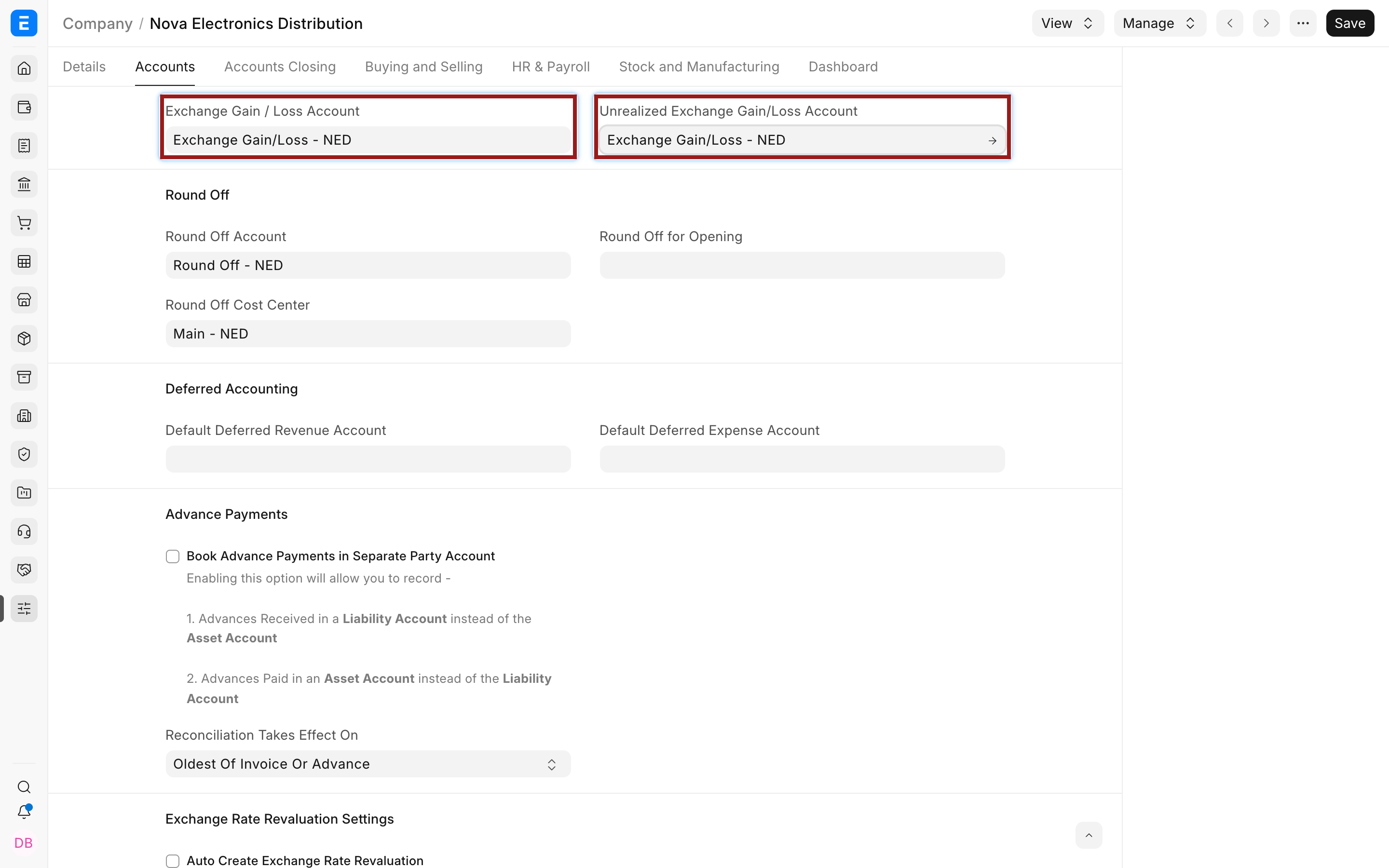
Create an eligible closing-date rate in Currency Exchange or verify the active provider in Currency Exchange Settings. Confirm that the Accounting Period is open and the user can submit revaluations and Journal Entries.
Review the currency controls in Accounts Settings before closing so the stored-rate age policy matches finance’s approved procedure.
Create an Exchange Rate Revaluation
Section titled “Create an Exchange Rate Revaluation”- Open Accounting > Multi Currency > Exchange Rate Revaluation.
- Select Add Exchange Rate Revaluation.
- Enter the Posting Date and Company.
- Set Rounding Loss Allowance only when a small balance should be treated as zero. The allowed value is from 0 inclusive to less than 1.
- Select Get Entries.
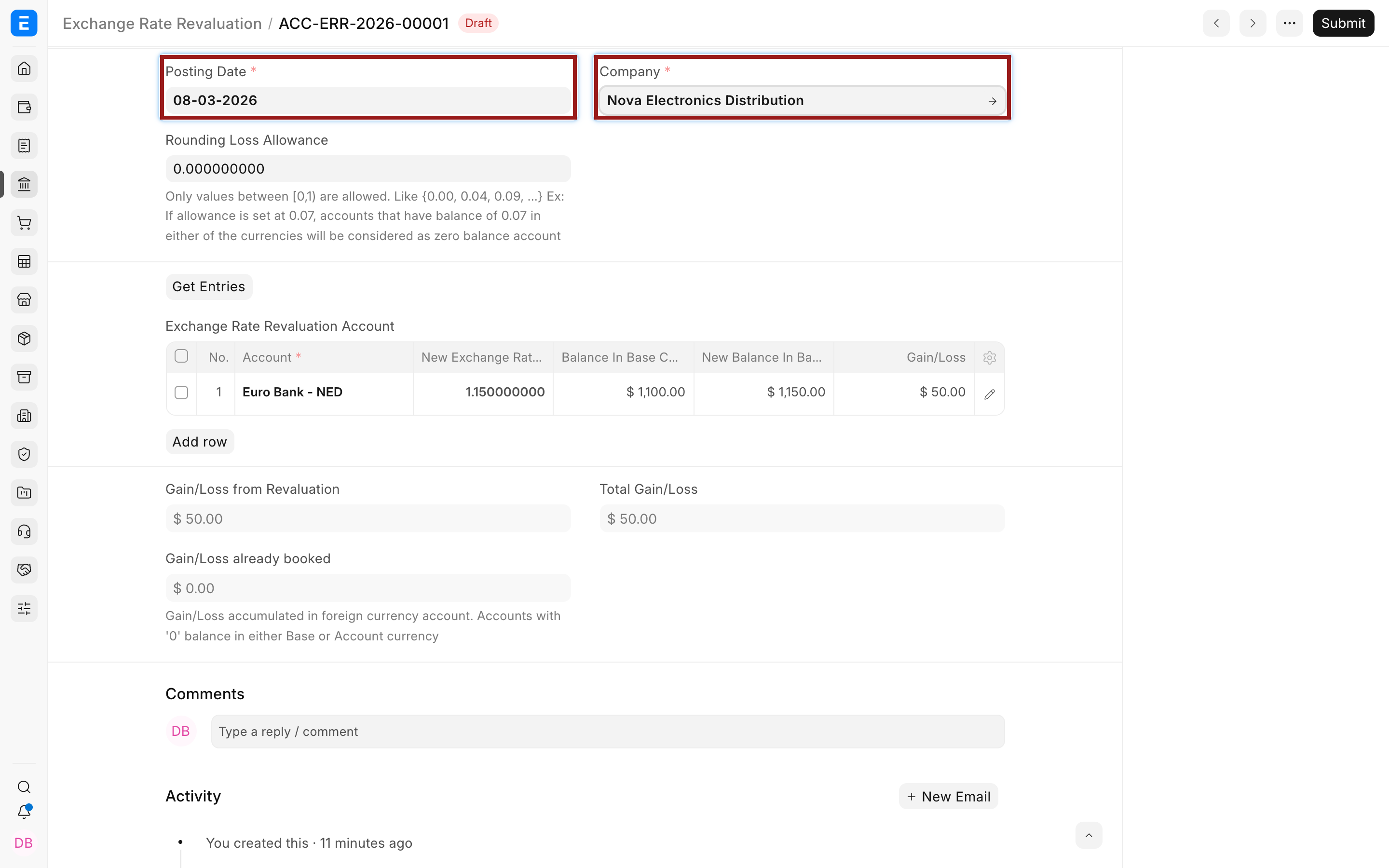
Bravo Hub ERP fetches eligible foreign-currency accounts, their account and base balances, the current carrying rate, the new rate for the posting date, the new base balance, and the calculated gain or loss.
Review the fetched accounts
Section titled “Review the fetched accounts”Do not submit immediately. Review each account against the General Ledger, the approved closing rate, and the underlying bank, receivable, payable, or other balance.
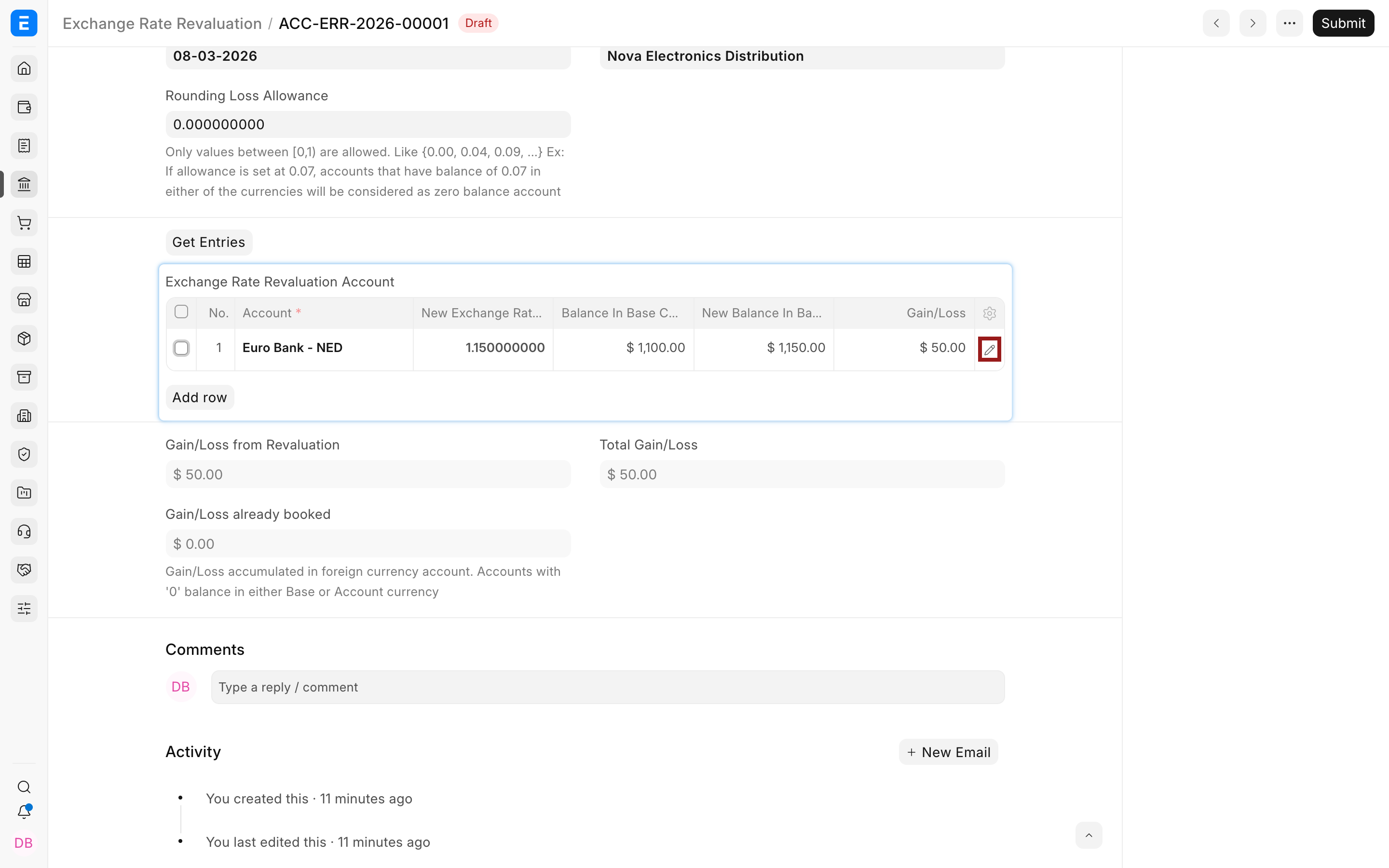
Select the highlighted pencil to open the full child-row editor.
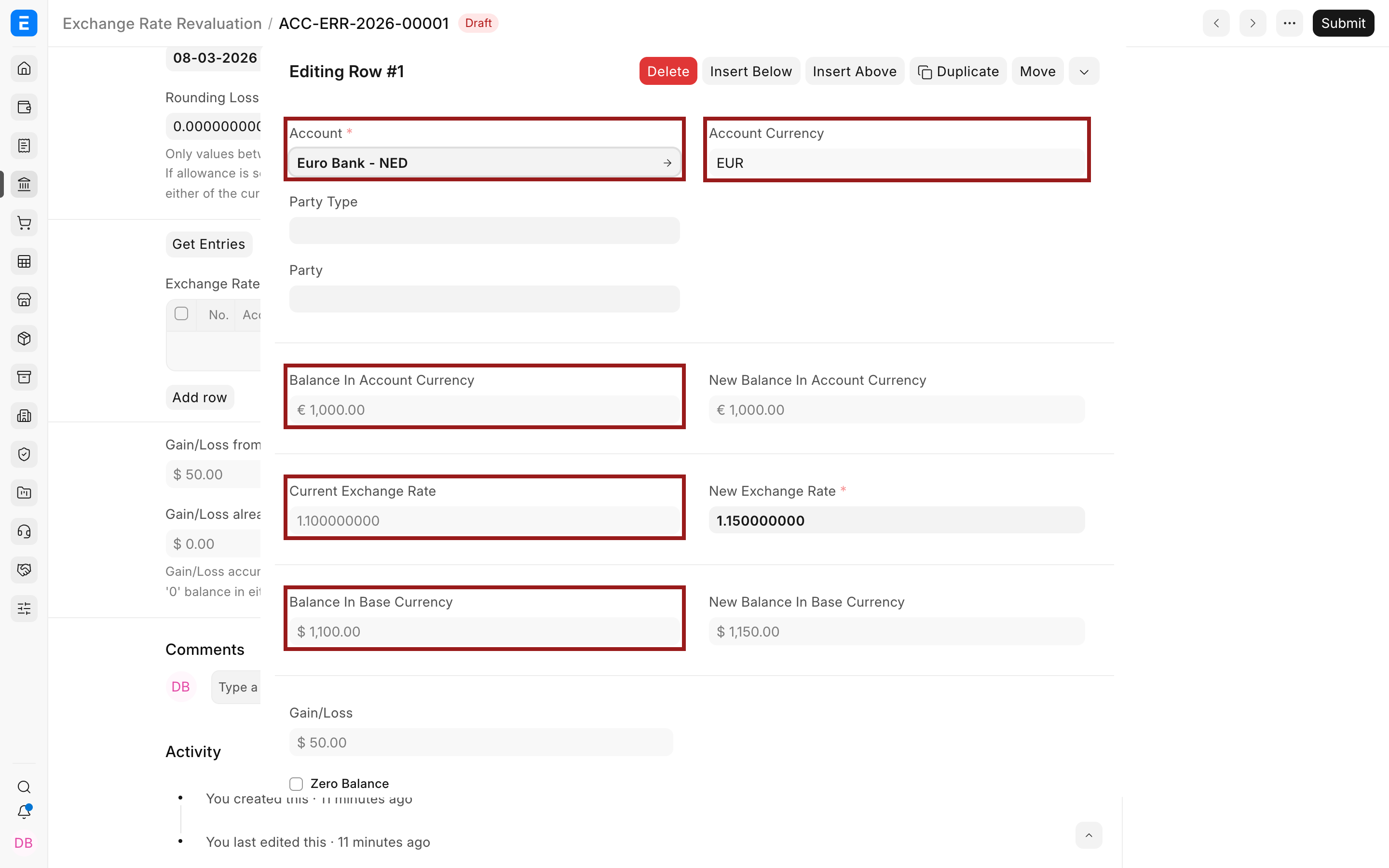
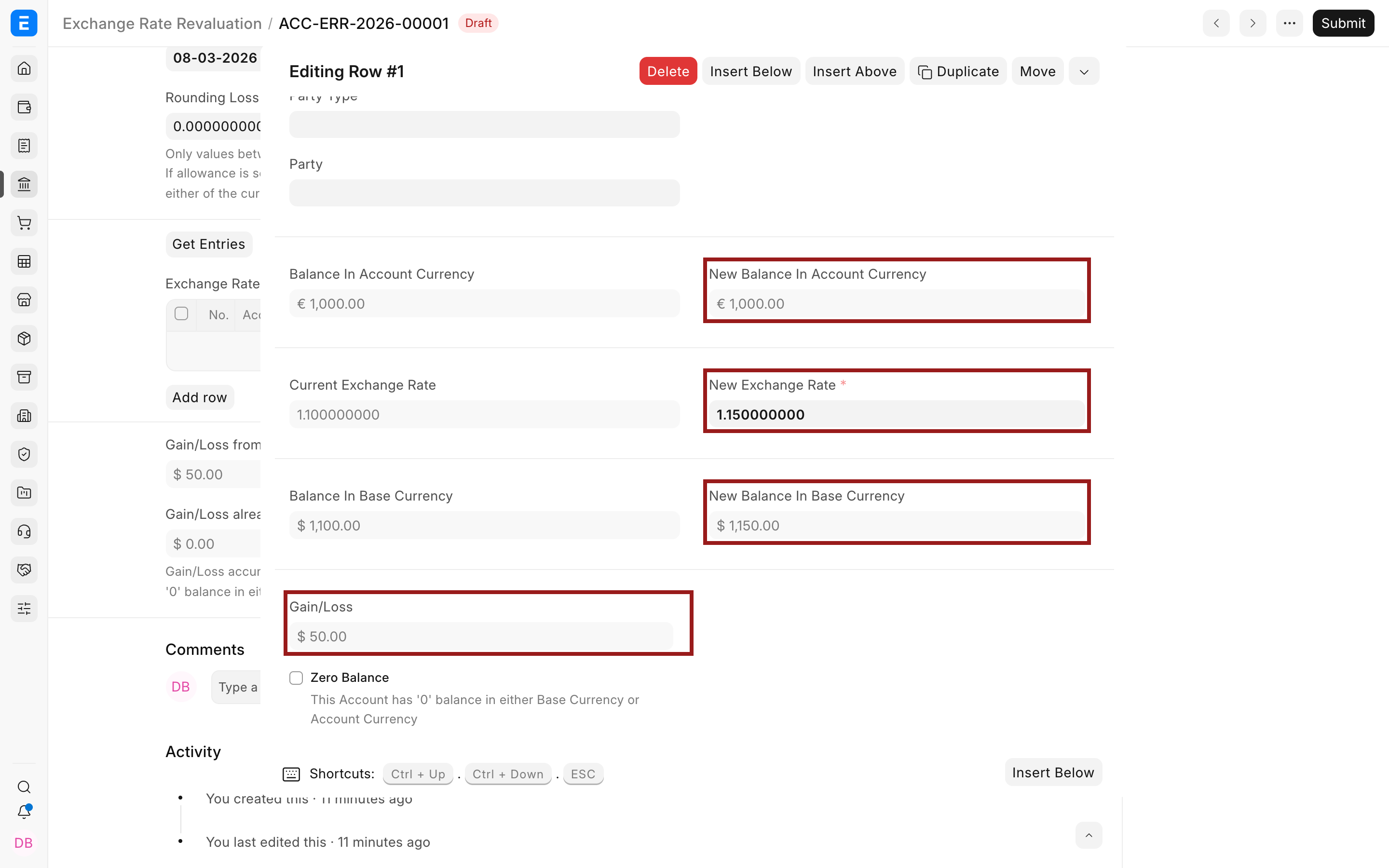
| Field | Meaning |
|---|---|
| Account | The foreign-currency balance-sheet ledger being revalued. |
| Account Currency | The fixed currency of that ledger. |
| Balance in Account Currency | Net debit less credit in the foreign currency up to the Posting Date. |
| Balance in Base Currency | Existing Company-currency carrying value. |
| Current Exchange Rate | Existing base balance divided by the foreign balance when the foreign balance is non-zero. |
| New Exchange Rate | Closing-date rate used for revaluation. Review it before submission. |
| New Balance in Account Currency | Normally unchanged from the existing foreign balance. |
| New Balance in Base Currency | Foreign balance multiplied by the new rate. |
| Gain/Loss | Difference between new and existing base balance. |
| Zero Balance | Identifies a case where either the base or account-currency balance is treated as zero. |
The example retains EUR 1,000 but changes its USD value by USD 50.
Review the totals
Section titled “Review the totals”The parent document separates ordinary revaluation gain or loss from gain or loss already accumulated on zero-balance cases.
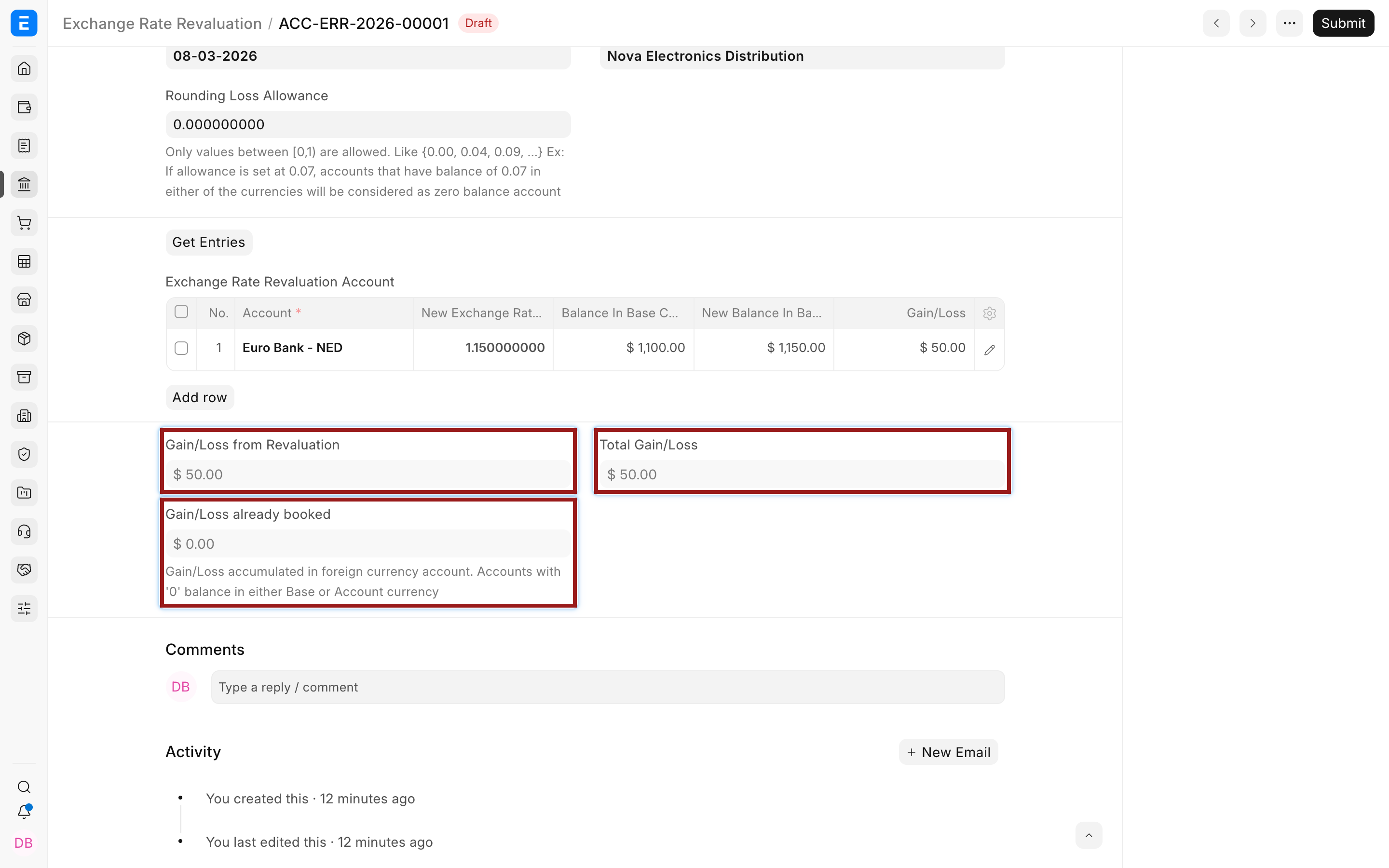
| Total | Meaning |
|---|---|
| Gain/Loss from Revaluation | Unbooked change calculated for ordinary non-zero foreign balances. |
| Gain/Loss already booked | Difference associated with accounts whose account or base balance is zero. |
| Total Gain/Loss | Combined result for the document. |
From Bravo Hub ERP v14 onward, zero-balance cases are handled by a separate Exchange Gain/Loss Journal Entry in Draft. This addresses situations where a foreign balance is zero but a residual Company-currency balance remains, or the reverse.
Submit and create Journal Entries
Section titled “Submit and create Journal Entries”- Save the revaluation and resolve any incorrect account or rate.
- Submit it. Rows without a gain or loss are removed.
- From Create, select Journal Entries.
- Open the created Journal Entry and verify the account rows, Company-currency debit and credit, reference to the revaluation, and posting date.
- Submit the Journal Entry only after review.
Submitting the revaluation calculates and locks the reviewed result, but the General Ledger is affected by the resulting submitted Journal Entry. If the Journal Entry remains Draft, reports do not yet include the revaluation posting.
Use Journal Entry permissions and period-close controls consistently. The unrealized account balances the adjustment to the foreign-currency ledger.
Verify the result
Section titled “Verify the result”Run the General Ledger for the foreign account and revaluation date. Confirm:
- the account-currency balance remains the same;
- the Company-currency carrying value changes by the expected gain or loss;
- the Journal Entry references the Exchange Rate Revaluation;
- the offset reaches the configured unrealized account;
- financial statements now use the updated Company-currency balance.
Also review Accounts Receivable and Payable when party balances are involved. Its Revaluation Journals option affects how revaluation journals are considered in outstanding reporting.
Automate creation carefully
Section titled “Automate creation carefully”The Company can automatically create Exchange Rate Revaluation records at a Daily, Weekly, or Monthly frequency. Submit ERR Journals? controls whether the resulting Journal Entries are submitted automatically.
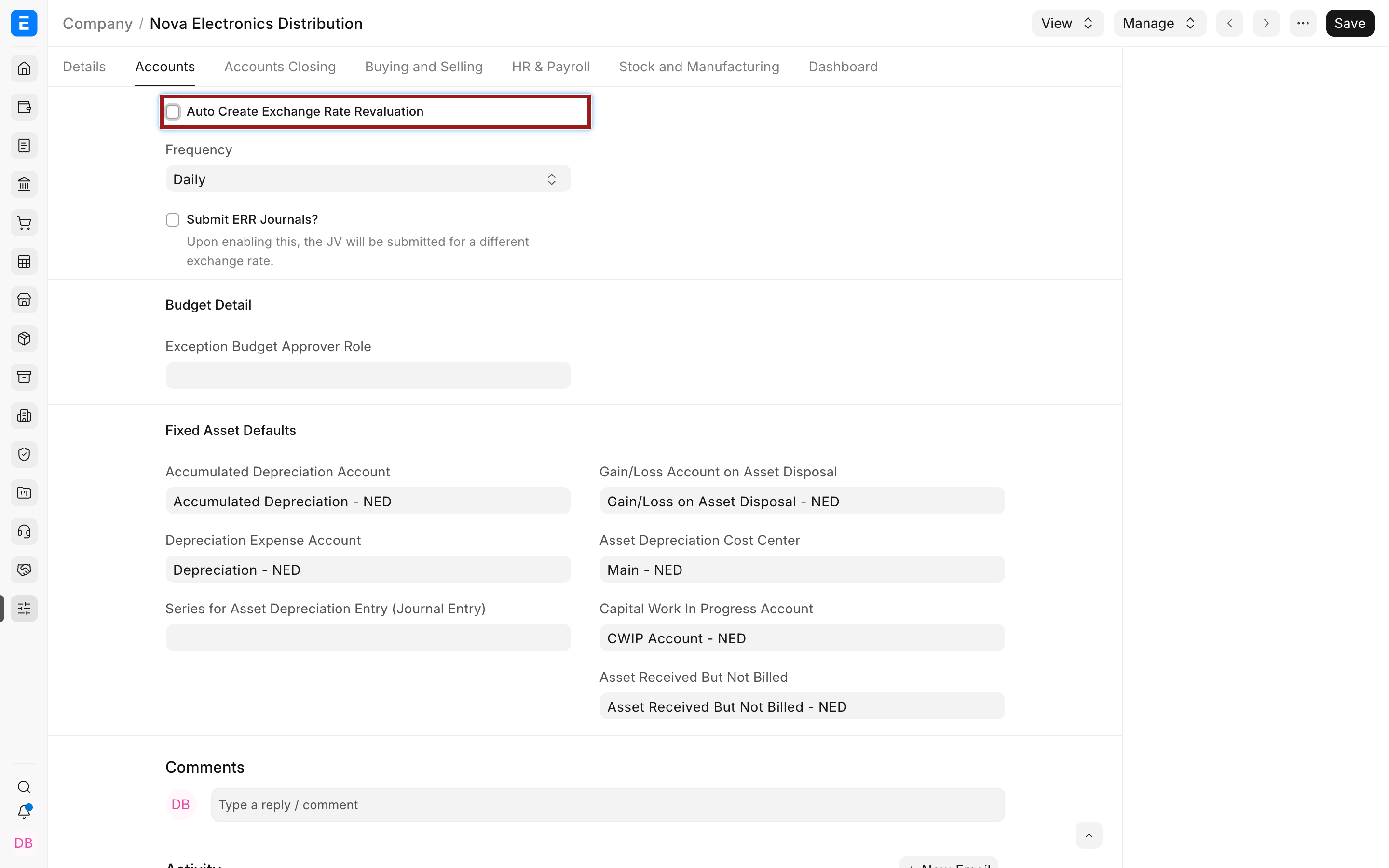
Start with manual review. Automate only after finance trusts the provider, closing-date selection, account coverage, unrealized account, and reversal or closing procedure. Automatic submission reduces the opportunity to catch an unexpected rate or account balance.
Reversal and later periods
Section titled “Reversal and later periods”Current develop supports creating reversal Journal Entries after revaluation journals are posted. Whether and when to reverse depends on your accounting policy and reporting cycle. Do not manually cancel or duplicate entries without checking the linked revaluation and subsequent periods.
A later revaluation should use the latest carrying value and the new closing rate. It should not rewrite the original invoice, payment, or historical Currency Exchange record.
Troubleshooting
Section titled “Troubleshooting”Get Entries returns no accounts
Section titled “Get Entries returns no accounts”Verify that the Account currency differs from Company currency, the account is a non-stock balance-sheet account, it has qualifying ledger balances by the Posting Date, and the selected Company is correct.
The new exchange rate is zero or missing
Section titled “The new exchange rate is zero or missing”Check the exact currency direction, transaction date, stale-rate rules, stored Currency Exchange record, and provider coverage. Create an approved manual rate if required.
The revaluation is submitted but the ledger did not change
Section titled “The revaluation is submitted but the ledger did not change”Open the linked Journal Entry. It must be created and submitted. A Draft Journal Entry has no General Ledger effect.
The foreign balance is zero but Company currency remains
Section titled “The foreign balance is zero but Company currency remains”Review the Zero Balance row and the separate Exchange Gain/Loss journal behavior. Do not enter a fictional foreign amount merely to force the base balance to zero.
Is revaluation the same as exchange gain or loss on payment?
Section titled “Is revaluation the same as exchange gain or loss on payment?”No, revaluation records an unrealized reporting-date change on an open balance. Payment settlement records a realized difference.
Does revaluation change the foreign-currency balance?
Section titled “Does revaluation change the foreign-currency balance?”No, it changes the Company-currency carrying value while retaining the account-currency amount.
Must I revalue every foreign-currency transaction?
Section titled “Must I revalue every foreign-currency transaction?”No, revalue eligible open balance-sheet accounts according to your reporting policy, commonly at period end.
Can I edit the New Exchange Rate?
Section titled “Can I edit the New Exchange Rate?”Review and, where permitted, adjust it before submission using an approved rate. Record the source and approval outside the narrative if your controls require it.
Should automatic Journal Entries be submitted automatically?
Section titled “Should automatic Journal Entries be submitted automatically?”Only when the process has been tested and finance accepts the reduced review step. Draft creation is safer during rollout.