
Disable Rounded Total
هذا المحتوى غير متوفر بلغتك بعد.
All the sales transactions like Sales Order, Sales Invoice have Rounded Total in it. It is calculated based on the value of Grand Total. Moreover, Rounded Total is also visible in the Standard Print Formats.
Note: The Rounded Total is a feature present in Sales transactions.
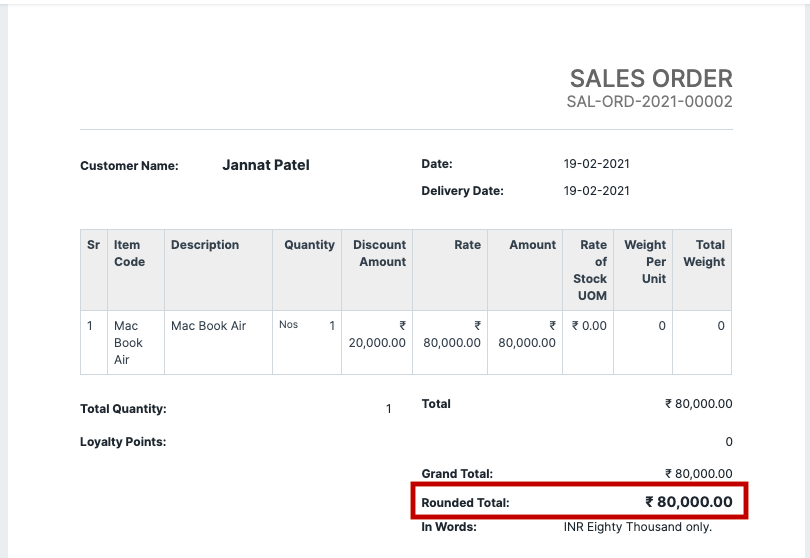
However, if you wish to disable the same, you may follow the steps given below to hide the rounded total from Standard Print Formats, for all the sales transactions.
Step 1: Go to Global Defaults
Section titled “Step 1: Go to Global Defaults”From the Awesome Bar search for Global Defaults
Step 2: Disable Rounded Total
Section titled “Step 2: Disable Rounded Total”Check Disable Rounded Total, and click on save.
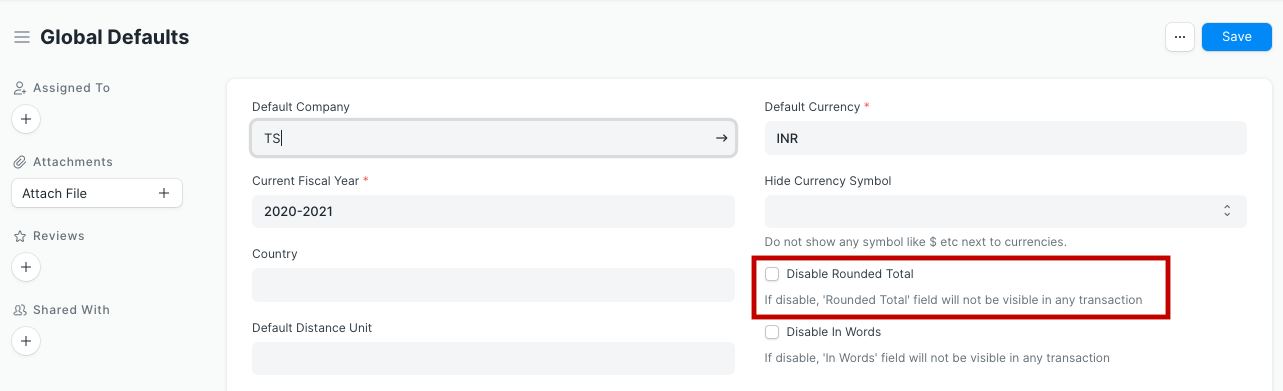
To verify the changes, you should clear the cache and/or refresh your Bravo Hub ERP account. Then your print formats shall not render value for the Rounded Total.
Note: This setting will only affect Standard print formats.