
Milestone Tracking
Introduced in Version 12
You can automatically track milestones based on the lifecycle of a document if it undergoes multiple stages.
The configuration for Milestone setting can be set in Milestone Tracking and each milestone is updated in Milestone
To access Milestone Tracker, go to:
Home > Settings > Milestone Tracker
1. Creating a Milestone Tracker
Section titled “1. Creating a Milestone Tracker”- Click on New.
- Set the Document Type to track (example: “Issue”).
- Set the field that represents stages (example: “Status”).
Note: A milestone stage can be defined by Link or Select properties.
Once this is set, a new Milestone record is created every time the status of any issue is changed.
The Milestone can be viewed in the timeline of the view:
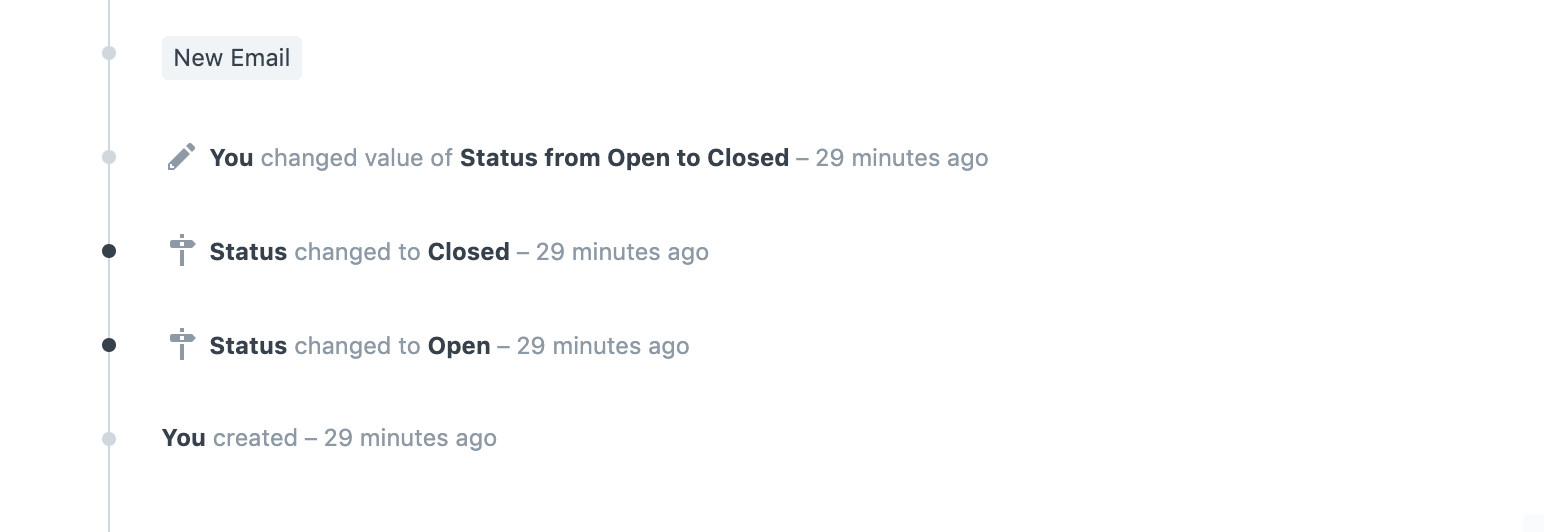
Note: Milestones work independently of Versions.
2. Features
Section titled “2. Features”Milestones can be a great source for reporting and notifying. For example, if Lead Qualification is a milestone on “Lead”, milestones can help generate reports on the number of leads being qualified in a period.
2.1 Using Milestones with Dashboards
Section titled “2.1 Using Milestones with Dashboards”Used along with Dashboards, Milestones can help track the trends in milestones. For example, if “Qualification” is tracked as a “Lead Stage”, a Dashboard on Milestone filtered by Qualification will show the trends of leads qualified.
2.2 Using Milestones with Energy Points
Section titled “2.2 Using Milestones with Energy Points”Energy Point Rules can be defined to automatically give Energy Points to users who achieve a milestone. This can be used to incentivize action on transactions at various levels.